Magical Woods: A Procreate Palette for Digital Artists
In the vast landscape of digital illustration, the right color palette can transform a flat sketch into a living, breathing world. For artists seeking to capture the ethereal beauty of forests, ancient groves, and mystical landscapes, Magical Woods offers a curated solution designed specifically for the Procreate app. This resource is not merely a collection of random hex codes; it is a thoughtfully constructed tool that bridges the gap between imagination and execution, allowing creators to focus on composition and storytelling rather than color theory struggles.
The Essence of the Magical Woods Collection
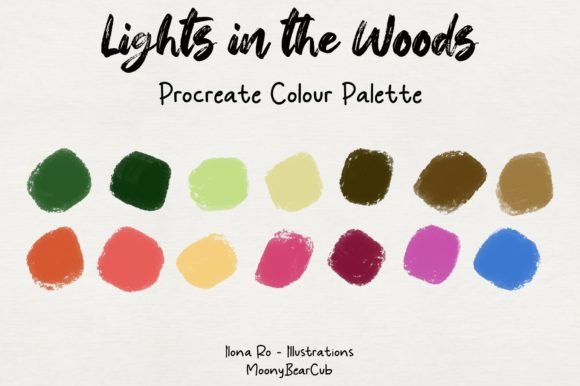
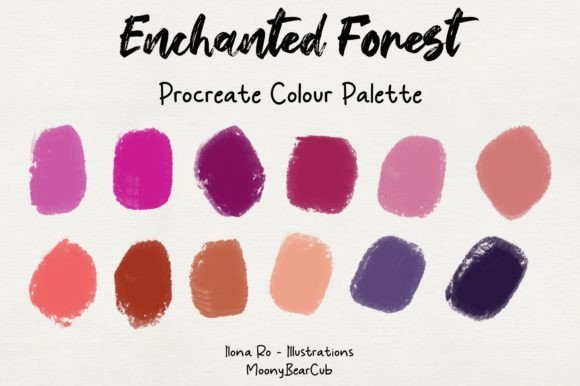
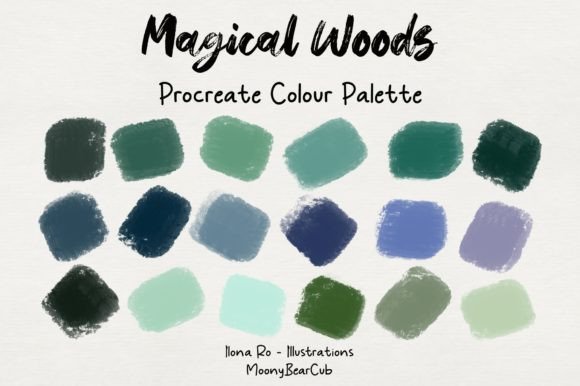
At its core, Magical Woods is a digital asset pack containing up to 30 distinct swatches. These colors are selected to mimic the natural yet enchanted atmosphere found in fantasy art, storybook illustrations, and atmospheric concept designs. The palette avoids harsh primaries, favoring instead a spectrum of deep moss greens, twilight purples, earthy browns, and soft, glowing highlights that suggest moonlight filtering through leaves.
What sets this collection apart is its cohesion. Many free palettes available online suffer from disjointed tones that clash when layered. In contrast, Magical Woods ensures that every shade harmonizes with the others. Whether you are painting a background or detailing a character's clothing, the colors work together to create a unified visual language. This harmony is crucial for maintaining immersion in your artwork, ensuring that the viewer feels transported to the scene you are creating.
Seamless Integration into Your Workflow
One of the primary challenges for digital artists is managing resources without interrupting their creative flow. The design of Magical Woods addresses this by prioritizing ease of use. The process begins with a simple download. You will receive a .zip file containing the palette data. This compression format is standard across devices, ensuring compatibility regardless of whether you are using an iPad, iPhone, or even a desktop computer before transferring files.
Once downloaded, the installation process is remarkably straightforward:
- Unzip the File: Locate the downloaded archive on your device and extract the contents. This usually reveals a single file with a specific extension recognized by Procreate.
- Import Automatically: With the extracted file ready, simply tap on it. If your device permissions are set correctly, this action triggers the Procreate app to open immediately.
- Access Your Colors: Inside Procreate, navigate to the Color panel. You will find the new Magical Woods palette listed among your custom collections, ready for immediate use.
This "click-to-import" functionality eliminates the need for complex manual entry or third-party conversion tools. It respects the artist's time, allowing you to move from setup to creation in seconds.
Who Benefits from This Palette?
While the name suggests a niche appeal to fantasy artists, the utility of Magical Woods extends far beyond a single genre. Its versatility makes it a valuable asset for various types of creators:
- Fantasy Illustrators: For those drawing elves, dragons, or enchanted castles, this palette provides the foundational tones needed to build believable magical environments.
- Children's Book Authors: Storytellers often need soft, inviting colors that feel safe yet adventurous. The muted saturation in this collection is perfect for bringing whimsical characters to life.
- Landscape Designers: Even non-fantasy nature scenes benefit from these tones. The depth provided by the darker greens and browns adds realism to forest studies and botanical sketches.
- Mood Board Creators: Graphic designers and business owners looking to evoke a sense of mystery, growth, or tranquility in branding materials can use these swatches to establish a unique aesthetic identity.
Practical Applications and Real-World Scenarios
To understand the true value of Magical Woods, consider how it functions in actual projects. Imagine you are tasked with creating a cover image for a self-published novel about a lost kingdom hidden in the trees. Without a dedicated palette, you might spend hours mixing shades of green that eventually look muddy or inconsistent. By utilizing the pre-set swatches, you instantly have access to a range of foliage tones—from the shadowed undergrowth to the sun-dappled canopy.
Furthermore, the palette includes subtle accent colors. These are often the "magic" elements in a piece—a faint blue glow, a warm amber light, or a dusty rose hue. In a practical scenario, an artist could use the main greens and browns for the environment and then select one of the lighter, more saturated swatches to highlight a character's eyes or a glowing artifact. This technique draws the viewer's eye exactly where the artist intends, enhancing the narrative impact of the image.
For professionals working on tight deadlines, such as commercial illustrators or marketing teams, the efficiency gained is significant. The ability to start with a cohesive color scheme reduces the revision cycle. Clients are less likely to request changes regarding color clashes because the underlying palette is already balanced. This reliability allows artists to deliver high-quality work consistently.
Evaluating Suitability for Your Projects
While Magical Woods is powerful, it is important to evaluate whether it fits your specific project needs. Every artistic endeavor has unique requirements, and no single palette is a universal cure-all.
If your project demands high-contrast, neon aesthetics typical of cyberpunk or futuristic sci-fi themes, this palette may feel too organic and subdued. Similarly, if you are working on minimalist corporate graphics that require stark blacks, whites, and primary blues, the earthy tones of Magical Woods might be distracting. However, for any project rooted in nature, fantasy, nostalgia, or organic textures, this collection is highly suitable.
Consider also the stage of your workflow. This palette excels during the blocking-in phase and the rendering stages. It provides a solid foundation upon which you can layer textures and lighting effects. However, experienced artists should remember that a palette is a starting point, not a constraint. You are encouraged to mix these colors with your own custom shades or adjust opacity levels to suit your specific vision.
Strengths and Considerations
The primary strength of Magical Woods lies in its curation. The creator has done the heavy lifting of color selection, saving you from the paralysis of choice. The inclusion of up to 30 swatches offers enough variety for complex compositions without overwhelming the user. Additionally, the seamless import process via the .zip file ensures that technical barriers are minimized.
However, there are considerations to keep in mind. Because the colors are optimized for the Procreate app on Apple devices, slight variations in color reproduction may occur if you export your work to other platforms or print media. Always calibrate your screen and check proofs if color accuracy is critical for your final output. Furthermore, while the palette is versatile, relying on it exclusively for every piece of art could lead to a repetitive style. Using it as a reference or a base, rather than a strict rule, will yield the most dynamic results.
Conclusion: Unlocking Creative Potential
In the world of digital art, tools that simplify the technical aspects of creation allow the human element—imagination—to shine. Magical Woods serves this purpose beautifully. By providing a rich, harmonious set of colors tailored for enchanting and natural scenes, it empowers artists to bring their visions to life with confidence and speed.
Whether you are a hobbyist exploring your first digital painting or a professional illustrator delivering client work, the ease of importing this palette and the quality of its swatches make it a worthwhile addition to your toolkit. Unzip the file, click to import, and let the colors guide your hand. The forest awaits, and with Magical Woods, you have everything you need to paint it.