Mastering Comic Letter Stamps for Procreate: A Practical Guide for Digital Artists
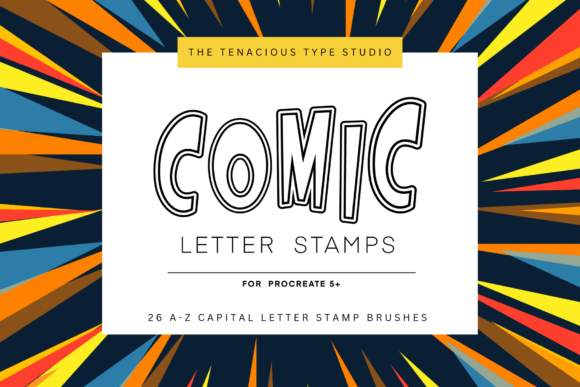
Digital lettering has evolved significantly over the past decade, moving from simple text tools to complex, hand-crafted brush ecosystems. For artists working within the iPad ecosystem, Comic Letter Stamps for Procreate represents a specialized tool designed to bridge the gap between traditional comic book aesthetics and modern digital efficiency. This resource is not merely a font replacement; it is a curated collection of twenty-six individual stamps, covering the entire alphabet from A to Z, engineered specifically for the Procreate 5 interface.
Understanding whether this specific brush set aligns with your workflow requires a clear look at its mechanics, intended use cases, and how it compares to broader lettering solutions. Unlike standard typography tools that offer uniformity, these stamps are built to mimic the organic, slightly irregular feel of hand-drawn comic headers. Each stamp is oriented to the screen and responds to variable pressure at input, allowing for a degree of customization that static fonts cannot provide. This article explores the practical applications, strengths, and limitations of this tool to help you determine if it fits your creative needs.
Understanding the Mechanics of Variable Pressure Stamps
The core distinction of Comic Letter Stamps for Procreate lies in its technical implementation. Most digital lettering resources fall into two categories: vector-based fonts or static image stamps. Fonts are scalable and editable but often lack the textured, hand-made quality desired in comic art. Static stamps offer texture but are rigid in size and orientation. This brush set attempts to hybridize these approaches.
By utilizing variable pressure stroke input, the brushes allow the artist to control the weight and presence of each letter. When you press harder with the Apple Pencil, the stroke may thicken or darken, simulating the natural variation found in inked lettering. This feature is crucial for maintaining visual interest in headlines and sound effects, where uniformity can appear sterile. However, it is important to note that this functionality is strictly compatible with Procreate 5. Users on older versions or different platforms will not be able to utilize these specific dynamic features, which is a significant consideration for those managing cross-platform workflows.
Best-Fit Scenarios for Comic Style Lettering
This tool shines in specific contexts where speed and style intersect. For creators producing seasonal greetings, special occasion cards, or social media graphics, the pre-outlined comic style saves considerable time. Instead of sketching each letter from scratch, artists can stamp the initial shape and then refine it. This is particularly useful for:
- Crafting Projects: Digital planners and printable crafts benefit from the bold, readable nature of comic outlines.
- Seasonal Content: Quick turnaround times for holiday posts require assets that look finished with minimal adjustment.
- Comic Panels: Integrating dialogue or sound effects directly into illustrations without switching to a separate typesetting program.
The "outline" style mentioned in the product description suggests that these stamps are designed to be filled in or layered. This offers flexibility in color theory application, allowing artists to match the lettering to their specific palette rather than being stuck with a predefined black-and-white scheme.
Comparing Stamp Sets to Alternative Lettering Methods
When evaluating Comic Letter Stamps for Procreate, it is helpful to compare it against other common methods digital artists use to achieve similar results. The decision often comes down to a trade-off between control, speed, and authenticity.
Stamps vs. Hand-Lettering Brushes
Traditional hand-lettering brushes require the artist to draw every curve and line manually. This approach offers the highest level of artistic control and uniqueness but demands significant skill and time. In contrast, the stamp set provides a consistent base structure. If you are an experienced letterer, you might find stamps restrictive because they impose a specific geometric style. However, for those who struggle with consistent letter proportions, the stamps serve as an excellent scaffold. You can stamp the letter and then use the liquify or transform tools to tweak the shape, achieving a balance between consistency and custom flair.
Stamps vs. Standard Fonts
Standard comic fonts are widely available and easy to edit. They are ideal for long-form text or when exact spelling corrections are needed frequently. The limitation of fonts is their repetitive nature; the letter "A" always looks exactly the same, which can break the immersion in a hand-drawn comic. Comic Letter Stamps for Procreate introduces subtle variations through pressure sensitivity, making each instance feel slightly more organic. However, you lose the ability to easily backspace and retype. If you misspell a word, you must delete the entire stamp and start over, which can be frustrating during rapid ideation phases.
Evaluating Limitations and Decision Factors
No tool is universally perfect, and understanding the constraints of this brush set is essential for making an informed purchase decision. The primary limitation is its specificity. Because it includes only one brush set with twenty-six letters, it does not offer numbers, punctuation, or alternative stylistic variants (such as bold, italic, or distressed versions). This means it is best suited for short titles, initials, or single-word emphasis rather than full sentences or paragraphs.
Furthermore, the compatibility restriction to Procreate 5 is a critical factor. As software updates occur, users must ensure their device and app version remain supported. For professionals who rely on backward compatibility or who collaborate with teams using different software suites, this siloed nature might be a drawback. It is a niche tool for a specific ecosystem, not a universal asset.
Who Should Avoid This Tool?
While Comic Letter Stamps for Procreate offers distinct advantages for certain users, it may not be the right choice for everyone. You might want to explore alternatives if:
- You require extensive punctuation and numerical characters for data visualization or instructional comics.
- You prefer complete freedom in letterform design and find pre-made shapes too restrictive.
- You work primarily in vector-based programs like Adobe Illustrator, where raster-based Procreate brushes do not integrate seamlessly.
- You need a solution that works across multiple devices and operating systems beyond the iPad.
Practical Tips for Maximizing Value
If you decide that this tool fits your workflow, there are several ways to enhance its utility. Since each stamp is oriented to the screen, take advantage of Procreate’s transformation tools. After stamping a letter, you can rotate, skew, or distort it to fit dynamic angles in your composition. This prevents the lettering from looking too "stamped on" and helps it integrate with the perspective of the underlying artwork.
Additionally, consider layering. Use the outline nature of the stamps to create depth. Place a solid color layer beneath the stamped outline, or add a drop shadow effect to make the letters pop against busy backgrounds. Because the strokes have variable pressure, experimenting with different opacity settings can yield softer, more integrated looks that blend better with watercolor or sketch-style backgrounds.
Ultimately, Comic Letter Stamps for Procreate is a specialized instrument in the digital artist’s toolkit. It excels in scenarios where quick, stylish, and consistent comic-style lettering is needed without the time investment of drawing each character from scratch. By weighing its ease of use against its limitations in flexibility and compatibility, you can determine whether it complements your existing resources or if a more versatile lettering solution better serves your long-term creative goals.