Unlocking Culinary Creativity: A Guide to 100 Food Stamps for Procreate
In the rapidly evolving landscape of digital illustration, the ability to quickly iterate on complex textures and patterns is a defining skill for professional artists. While traditional food illustration requires hours of meticulous rendering to capture the gloss of a strawberry or the flakiness of a croissant, modern workflows have introduced tools that bridge the gap between speed and realism. Among these resources, 100 Food Stamps for Procreate has emerged as a significant asset for designers looking to enhance their culinary portfolios without sacrificing artistic integrity. This comprehensive guide explores how this specific brush pack transforms the iPad into a versatile studio for food design, advertising, and concept art.
The Evolution of Digital Food Illustration
Food illustration has historically been one of the most demanding genres in visual arts. It requires an intimate understanding of light reflection, texture variation, and color theory to make a subject look appetizing rather than plastic. In the era of raster-based software like Photoshop, artists often relied on high-resolution stock photos masked onto vector shapes or spent days painting every crumb and droplet. The introduction of Procreate on the iPad changed the paradigm by offering a pressure-sensitive interface that mimics traditional media while providing the undo functionality and layer management of desktop software.
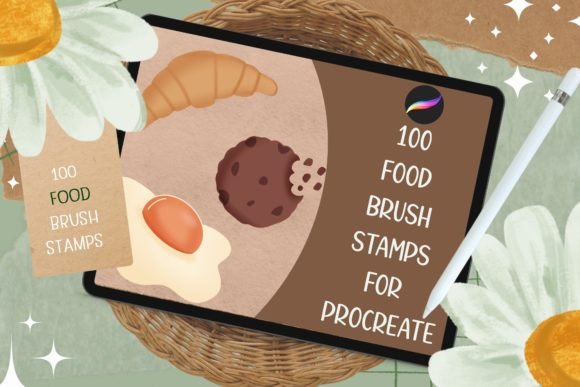
However, even with powerful hardware, repetitive tasks can slow down a creative workflow. This is where specialized stamp brushes become essential. Unlike standard drawing brushes that require continuous hand movement to build up form, stamp brushes allow an artist to place a pre-rendered element with a single tap. When applied to food illustration, this technology enables the rapid construction of scenes filled with scattered ingredients, garnishes, and background elements. The 100 Food Stamps for Procreate collection specifically addresses this need by offering a curated library of high-fidelity food assets ready for immediate deployment.
Understanding the Mechanics of Stamp Brushes
To fully utilize these resources, it is important to understand how they function within the application's engine. A stamp brush in Procreate is essentially a texture map embedded within a brush setting. When the user taps the screen, the app renders that texture at the current brush size, opacity, and rotation. The versatility of the 100 Food Stamps for Procreate lies in its configuration. These brushes are not static images; they are dynamic tools that respond to the user's input settings.
For instance, the "Shape" settings within the brush library determine how the stamp behaves when dragged versus tapped. Some users prefer a fixed orientation for uniformity, while others enable random rotation to create natural-looking scatterings of herbs, seeds, or crumbs. The "Spacing" parameter controls the distance between stamps if the stylus is dragged across the canvas, allowing for the creation of dashed lines of sprinkles or rows of berries. By mastering these settings, an artist can transform a simple set of 100 stamps into thousands of unique variations, ensuring that no two illustrations look identical.
Practical Applications in Professional Workflows
The utility of 100 Food Stamps for Procreate extends far beyond hobbyist sketching. For professionals in the food industry, marketing agencies, and packaging design firms, these tools offer a competitive edge in speed and consistency. One of the primary use cases is in menu design. Restaurants frequently need to update their menus with new seasonal items. Instead of commissioning a full photo shoot or hiring an illustrator to paint a new dish from scratch, a designer can use these stamps to composite a realistic-looking plate of food using existing assets. This approach significantly reduces production time and costs.
Another critical application is in packaging mockups. Before a product goes to print, brands often create digital mockups to visualize how the final packaging will look on shelves. Using food stamps allows designers to populate the background of a label with relevant ingredients—such as wheat stalks for bread, coffee beans for espresso, or chili flakes for hot sauce—to reinforce the flavor profile visually. The non-destructive nature of Procreate layers means these elements can be easily moved, recolored, or removed if the client requests changes, making the iteration process seamless.
Enhancing Concept Art and Storyboarding
In the realm of concept art for animation or video games, establishing the atmosphere of a scene is paramount. A bustling market stall, a cozy kitchen, or a lavish banquet table all rely heavily on the density and variety of food items present. Artists working on storyboards can use the 100 Food Stamps for Procreate to quickly block out these environments. Rather than worrying about the precise rendering of every apple in a fruit stand, the artist can focus on composition, lighting, and character interaction, knowing that the details can be fleshed out later with these efficient tools.
This efficiency also benefits educators and researchers who need to create visual aids for presentations or publications. Whether explaining the nutritional components of a meal or illustrating the history of cuisine, having access to a diverse range of food graphics ensures that the visuals are engaging and accurate. The ability to mix and match different stamps allows for the creation of custom compositions that perfectly match the narrative being presented.
Technical Integration and Customization
While the convenience of pre-made stamps is undeniable, true mastery comes from integrating them into a broader coloring and shading strategy. Procreate offers robust features like Color Drops, Layer Masks, and Blending Modes that work in tandem with stamp brushes to achieve photorealistic results. To demonstrate this workflow, consider the process of adding depth to a flat stamp of a lemon slice.
- Base Placement: Select the lemon stamp from the 100 Food Stamps for Procreate pack and place it on a new layer. Adjust the size and rotation to fit the composition.
- Color Adjustment: If the stamp does not match the lighting of the scene, use the "Adjustments" tool to change the hue, saturation, or brightness. Alternatively, use Color Drops to pick a specific shade of yellow from the palette and drag it over the stamp while holding the stylus to apply the new color instantly.
- Shading and Depth: Create a new layer above the stamp and set the blending mode to "Multiply." Use a soft airbrush to add shadows where the lemon would naturally curve away from the light source. This technique separates the stamp from the background and gives it volume.
- Highlighting: On another layer set to "Overlay" or "Screen," add specular highlights to mimic the wet, glossy surface of the citrus fruit. This step is crucial for making the food look fresh and appetizing.
- Masking: If the stamp needs to blend seamlessly with other elements, such as a glass of water or a wooden board, use a Layer Mask to erase parts of the stamp or soften its edges.
This multi-layered approach ensures that the final image retains the crispness of the original stamp while adapting to the specific lighting conditions of the artwork. It demonstrates that these brushes are not shortcuts for lazy design but rather foundational elements for sophisticated digital painting.
Managing Layers and Organization
As projects grow in complexity, managing the sheer number of stamp instances becomes a logistical challenge. A busy food scene might contain dozens of individual stamps, each on its own layer. Procreate's layer organization features are vital here. Users should group related stamps together—for example, grouping all garnish elements into a "Garnish" folder and all main dish components into a "Main Course" folder. This structure allows for global adjustments, such as shifting the entire garnish group to better frame the subject or adjusting the opacity of the whole group to create a sense of atmospheric perspective.
Furthermore, utilizing clipping masks can streamline the coloring process. By placing a color layer clipped to a stamp layer, artists can experiment with different color schemes without affecting the underlying texture. This is particularly useful when creating variations of a product line, such as designing labels for a soda brand with different fruit flavors. The same base layout can be reused, with only the color layers changing to reflect cherry, lime, or orange varieties.
Strategic Considerations for Creators
When incorporating third-party assets like 100 Food Stamps for Procreate into commercial projects, it is essential to understand the licensing terms. Most digital brush packs are sold under licenses that permit use in both personal and commercial projects, provided the assets are not resold as standalone files. The prompt notes that these packs are "Non-refundable for digital projects," which underscores the importance of reviewing the license agreement before purchase. Creators must ensure they are compliant with the terms regarding attribution, modification rights, and distribution limits.
Additionally, there is a consideration regarding artistic authenticity. While stamps offer incredible speed, over-reliance on them can lead to generic-looking artwork. The most successful artists use these tools as a starting point, modifying the shapes, adding hand-painted details, and combining them with custom textures to create a unique style. The goal should be to leverage the efficiency of the stamps to free up time for creative decision-making, not to replace the creative process entirely.
Future Trends in Digital Asset Creation
Looking ahead, the demand for high-quality, niche-specific digital assets is expected to grow. As the tablet market expands and more creators move away from traditional desktop setups, the ecosystem of Procreate-compatible tools will continue to diversify. We may see the emergence of AI-assisted stamp generation, where artists can describe a food item and have a custom stamp generated on the fly. However, until then, curated collections like the 100 Food Stamps for Procreate remain the gold standard for reliability and quality.
The integration of these tools into educational curricula is also a growing trend. Art schools and online courses are increasingly teaching students how to manage digital libraries and utilize stamp brushes effectively. This shift acknowledges that modern illustration is as much about resource management and workflow optimization as it is about raw drawing talent. By learning to wield these tools effectively, the next generation of illustrators will be better equipped to meet the fast-paced demands of the digital economy.
Conclusion on Workflow Efficiency
The journey from a blank canvas to a finished food illustration involves a delicate balance of technical skill and creative vision. Tools like 100 Food Stamps for Procreate serve as powerful accelerants in this process, allowing artists to focus on the bigger picture of composition and storytelling. Whether you are a professional designer creating packaging for a global brand, an educator preparing visual materials, or a hobbyist exploring your passion for culinary art, these resources provide a foundation for success.
By understanding the mechanics of stamp brushes, leveraging Procreate's advanced layering capabilities, and adhering to best practices in asset management, creators can produce work that is both visually stunning and commercially viable. The key lies not just in having the right tools, but in knowing how to integrate them seamlessly into a personalized workflow. As the digital art world continues to evolve, the ability to adapt and utilize such specialized resources will distinguish the leaders in the field from the rest.