Washi Tape Procreate Digital Stamps: Elevate Your iPad Planning Experience
There is a distinct satisfaction in seeing a digital planner come to life, transforming from a static grid of dates into a vibrant, personalized roadmap for your week. For many users of the Procreate app on iPad, the missing piece of that puzzle has often been the tactile feel of physical stationery. That is where Washi Tape Procreate Digital Stamps bridge the gap between traditional desk organization and modern digital efficiency. These tools allow you to replicate the aesthetic charm of paper washi tape without the mess, the waste, or the need to carry a physical roll in your bag.
The Magic of Instant Customization
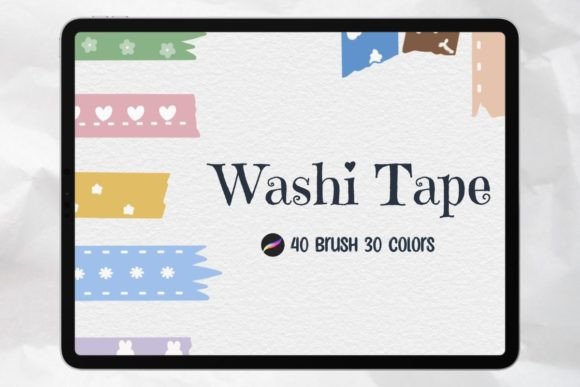
At its core, this digital asset collection is designed to make your note-taking and planning sessions more engaging. When you import the Procreate 40 Piece Washi Tape Brush Set, you are not just adding a few new icons to your palette; you are unlocking a creative workflow that mimics the layering and texture of real-world scrapbooking. The set includes 40 unique stamps that function exactly like physical tape rolls. You can place them over text, highlight important deadlines, or create decorative borders around your daily goals.
What sets this specific collection apart is the flexibility it offers. Unlike static image files that require complex editing to adjust, these stamps are built as brushes within the Procreate ecosystem. This means you can instantly change the color and size of each stamp with a simple tap. Imagine needing a soft pastel stripe for a gentle reminder versus a bold, neon strip for a critical project deadline. With the included 30 color stripes and the ability to customize hues, you have complete control over the visual hierarchy of your notes.
Real-World Scenarios for Digital Planners
The utility of Washi Tape Procreate Digital Stamps extends far beyond simple decoration. In practical terms, they serve as powerful organizational anchors. Consider the busy professional who manages multiple projects simultaneously. By assigning specific colors or patterns to different departments or clients, these digital tapes become a visual coding system. A blue striped border might denote client meetings, while a floral pattern indicates internal brainstorming sessions. This visual cue allows the brain to process information faster, reducing cognitive load during a hectic day.
For students and educators, the application is equally transformative. Study guides created in Procreate can be made significantly more memorable when key concepts are highlighted with colorful digital tape. Instead of using a standard highlighter tool that can sometimes wash out text, a semi-transparent washi tape stamp adds emphasis while maintaining readability. It turns a dry lecture summary into an interactive study aid that feels less like work and more like a creative project.
Even for hobbyists tracking habits, fitness routines, or reading lists, these stamps add a layer of gamification. Checking off a completed workout by "taping" over the date creates a sense of accomplishment similar to crossing something off a physical list, but with a much higher degree of aesthetic appeal. The act of selecting the perfect stamp becomes part of the ritual, making the user more likely to return to their planner consistently.
Seamless Integration into Your Workflow
One of the most significant barriers to adopting new digital assets is the learning curve involved in installation. Fortunately, this product is engineered for immediate usability. Files can be downloaded and used immediately upon purchase. The process involves importing the .brushset file directly into Procreate with just one click. There is no need for third-party software, complicated file conversions, or technical troubleshooting.
This seamless integration ensures that your creative flow is never interrupted. Whether you are setting up a brand new monthly spread or quickly jotting down a grocery list, the transition from idea to execution is instantaneous. The compatibility is strictly optimized for the Procreate App on iPad only, ensuring that the brush dynamics, opacity settings, and layer interactions behave exactly as intended by the creator. This exclusivity guarantees a high-fidelity experience that generic image overlays cannot match.
Creative Flexibility Across Industries
While planners are the primary use case, the versatility of these digital stamps opens doors for various industries and creative pursuits. Graphic designers often use Procreate for mood boards and initial concept sketches. Adding realistic-looking tape textures can help present ideas to clients in a way that feels tangible and grounded. The ability to resize and recolor allows designers to experiment with layout compositions rapidly before committing to a final vector design.
Content creators and social media managers also find value in these assets. Creating eye-catching graphics for Instagram stories or Pinterest pins requires unique elements that stand out in a crowded feed. Using Washi Tape Procreate Digital Stamps to frame quotes, highlight product features, or create custom backgrounds adds a handcrafted touch that resonates well with audiences seeking authenticity. The variety in the 40-piece set ensures that there is always a pattern that fits the current trend or brand identity.
Furthermore, journalers and bullet journal enthusiasts who have transitioned to digital formats often struggle to replicate the "scrapbook" look. These stamps solve that problem perfectly. They allow for the creation of intricate layouts where photos, text, and doodles are held together by digital strips of tape, preserving the nostalgic feel of analog journaling while leveraging the undo button and infinite canvas of digital art.
Considerations Before You Start
Before diving into this creative toolkit, it is helpful to understand a few practical considerations. First, ensure your device meets the requirements. As mentioned, this item is specifically for the Procreate App on iPad only. If you are using an Android tablet or a desktop computer, these files will not function. Additionally, while the customization options are vast, the base designs are fixed. You cannot alter the fundamental pattern of a stamp (for example, turning a polka dot into a stripe), but you can manipulate its scale and color to fit your needs.
Another point to consider is file management. While the import process is simple, having too many brush sets can clutter your Procreate interface. It is advisable to organize your library by creating folders for different themes, such as "Planner Elements," "Textures," and "Stamps." This keeps your workspace tidy and ensures you can find the specific Washi Tape Procreate Digital Stamps you need without scrolling through hundreds of options.
Finally, think about your personal style. The set includes 30 colors and 40 stamps, offering a wide range of aesthetics from minimalist lines to complex patterns. However, the most effective planners often utilize a consistent color palette. Rather than using every single option available, try selecting a cohesive group of three to five colors that complement your overall theme. This restraint often leads to a more polished and professional-looking result.
Unlocking Potential in Daily Organization
The true strength of Washi Tape Procreate Digital Stamps lies in their ability to transform a utilitarian task into a source of joy. In a world dominated by rigid apps and stark interfaces, these digital tools reintroduce warmth and personality to our daily schedules. They remind us that organization does not have to be sterile. By allowing you to change the color and size of each stamp, they empower you to adapt your tools to your changing moods and priorities.
Whether you are a student preparing for finals, a mother managing a household, or an entrepreneur mapping out a business strategy, the right tools can make all the difference. These stamps offer a low-friction way to enhance your digital environment. They are not just decorative; they are functional aids that help categorize, prioritize, and celebrate your progress. With the ability to download and start using them immediately, there is no reason to wait to upgrade your planning game. Your next digital notebook is waiting to be filled with color, creativity, and the satisfying snap of virtual tape.