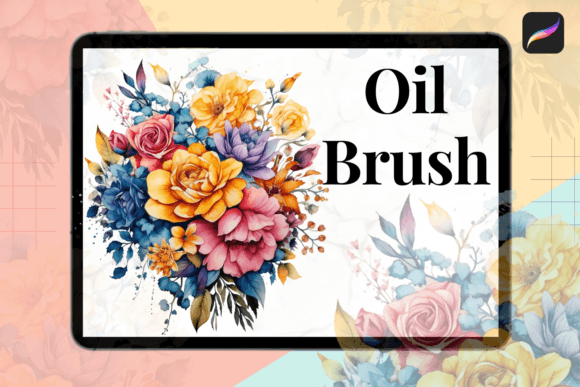
Procreate Oil Brush: Digital Painting Reimagined
The divide between traditional and digital art has always been defined by texture. For years, digital painters have chased the visceral satisfaction of dragging a bristle-loaded brush across canvas, seeking that specific resistance and pigment buildup that defines oil painting. Procreate Oil Brush, the revolutionary new tool by Zmapist, finally bridges this gap. It is not merely another brush pack; it is a sophisticated simulation engine designed to replicate the physical behavior of oil paint within the iPad ecosystem. For designers, illustrators, and hobbyists alike, this tool transforms the sterile precision of digital vectors into something organic, unpredictable, and deeply human.
Capturing the Essence of Traditional Media
The story of Procreate Oil Brush begins with a simple frustration shared by a group of passionate artists and developers. They loved the convenience of digital workflows—undo buttons, layer management, and infinite color palettes—but missed the soul of traditional media. Digital brushes often felt too uniform, lacking the chaotic beauty of real-world physics. After years of research and development, Zmapist created a solution that captures the essence of traditional oil painting without sacrificing digital flexibility.
What sets this tool apart is its attention to materiality. When you apply a stroke, you are not just placing pixels; you are simulating the interaction between viscous paint and textured surface. The brush accounts for pressure sensitivity to mimic the weight of the hand, allowing for thick impasto effects or thin, translucent glazes. This level of realism means you can achieve depth and vibrancy that rivals conventional canvases. The result is a game-changing product that allows creators to produce stunning paintings that look authentically handmade, blurring the line between the tablet screen and the easel.
Beyond Simulation: The Power of Digital Control
While the visual fidelity is impressive, Procreate Oil Brush is not just about recreating traditional techniques. It leverages the unique advantages of digital technology to offer innovative features that physical paint simply cannot match. This hybrid approach appeals to a wide audience, from fine artists to commercial designers who need efficiency alongside aesthetic quality.
Consider the control over opacity, size, and texture. In traditional painting, changing the consistency of your medium requires mixing solvents or waiting for layers to dry. With Procreate Oil Brush, these adjustments are instantaneous. You can toggle between heavy body paint and fluid washes with a slider, allowing for rapid experimentation. This flexibility is crucial for professionals working under tight deadlines. You can iterate on compositions, test color harmonies, and refine details without the logistical constraints of drying times or material costs.
- Dynamic Texture Mapping: Adjust the grain of the canvas in real-time to see how paint settles into different surfaces.
- Non-Destructive Editing: Modify brush strokes after application, preserving the original texture while correcting form.
- Customizable Blending: Control how colors mix on the virtual palette, preventing the muddy results common in lesser simulations.
This combination of realistic behavior and digital convenience makes it an invaluable asset for anyone looking to elevate their creative output. Whether you are creating concept art for games, illustrations for editorial pieces, or personal fine art, the tool adapts to your workflow rather than forcing you to adapt to it.
Practical Applications for Modern Creators
The versatility of Procreate Oil Brush extends far beyond fine art painting. Its ability to generate organic, textured visuals makes it highly relevant for branding, marketing, and design projects where authenticity is key. In an era dominated by clean, flat vector graphics, incorporating hand-painted elements can significantly enhance brand perception and audience engagement.
For brand identity projects, using this tool can add a layer of warmth and craftsmanship to logos and packaging design. A hand-painted logo element suggests care and individuality, distinguishing a brand from competitors relying on generic templates. Similarly, in editorial design, custom illustrations created with Procreate Oil Brush can provide a unique visual voice that resonates with readers on an emotional level. The texture and depth inherent in the brushstrokes draw the eye and encourage longer engagement with the content.
Social media managers and content creators will also find significant value here. Platforms like Instagram and Pinterest favor visually rich, authentic content. Posts featuring artwork created with Procreate Oil Brush stand out against the backdrop of polished, corporate imagery. The tool allows for the quick creation of background textures, overlays, and featured images that feel personal and curated, fostering a stronger connection with followers.
Choosing the Right Approach for Your Project
To get the most out of Procreate Oil Brush, it is essential to understand its strengths and limitations. While it excels at organic forms and expressive marks, it may not be the best choice for precise technical drawings or rigid geometric layouts. Here are some practical recommendations for integrating this tool into your workflow:
- Evaluate Project Fit: Ask yourself if the project benefits from an organic, handmade aesthetic. If the goal is clarity and minimalism, use the brush sparingly as an accent rather than the primary medium.
- Test Font Pairings: If you are combining painted elements with typography, choose fonts that complement the brush’s personality. A rough, textured serif font or a clean sans serif can balance the complexity of the oil strokes. Avoid overly decorative script fonts that might compete with the visual noise of the paint.
- Review Readability: When using painted backgrounds for text, ensure sufficient contrast. The rich textures of Procreate Oil Brush can sometimes interfere with legibility. Use solid color blocks or blur effects behind text to maintain clarity.
- Understand Licensing: Always review the commercial licensing terms provided by Zmapist. Ensure that your intended use, whether for client work or personal products, aligns with the agreement to avoid legal issues down the line.
Ultimately, Procreate Oil Brush is more than a software update; it is a shift in how we perceive digital creation. It invites us to slow down, embrace imperfection, and rediscover the joy of making marks. By merging the tactile pleasure of oil painting with the power of modern technology, it offers a pathway to create work that is not only visually striking but also emotionally resonant. For any creator looking to add depth, character, and professionalism to their portfolio, this tool is a worthy investment.