Mastering the Watercolor Painting Effect in Digital Design
The allure of traditional art lies in its imperfections—the way pigment bleeds into paper, the subtle granulation, and the organic flow of water. For digital creators, replicating this Watercolor Painting Effect has long been a challenge that separates amateur edits from professional-grade artwork. Whether you are designing for T-shirt printing, creating unique mug designs, or enhancing website showcase photos, achieving an authentic look requires more than just a simple filter. It demands control, precision, and the right tools.
Many designers rush into using automated scripts without understanding the underlying mechanics, leading to flat, unnatural results. This guide explores common pitfalls when applying digital watercolor techniques and offers practical advice on how to leverage professional Photoshop actions to achieve high-quality, customizable outcomes efficiently.
The Misconception of One-Click Perfection
A frequent mistake among beginners is assuming that a "one-click" solution will yield a masterpiece ready for client presentation. While modern Photoshop actions are incredibly powerful, treating them as black boxes often leads to disappointment. The issue isn't the tool; it is the lack of post-processing understanding. When you apply a Watercolor Painting Effect action, the software analyzes contrast, edges, and color values. If your source image is poorly lit or lacks definition, the output will reflect those flaws, amplified by the artistic style.
To avoid this, always prepare your source image. Ensure proper lighting and contrast before running the action. Professional results come from the synergy between a high-quality original photo and the artistic overlay. Do not rely solely on the script to fix exposure issues or blur. Instead, use the action as a transformative layer that enhances an already solid foundation.
Ignoring Layer Customization and Control
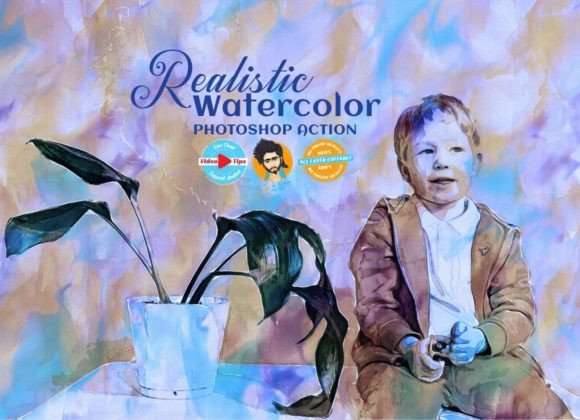
Another critical oversight is failing to utilize the editable nature of advanced action scripts. Many users apply the effect and immediately flatten the image, losing all ability to tweak the outcome. High-quality Photoshop actions, such as those designed for professional workflows, include named layers and grouped elements. These are not accidental; they are provided so you have full control over each aspect of the painting.
For instance, you might find that the watercolor bleed is too aggressive for a specific project, such as digital advertising where text readability is paramount. By keeping layers intact, you can adjust the opacity of specific brush strokes, modify color balance groups, or mask out areas where the effect distracts from the main subject. This level of customization ensures that the final piece retains the flavor of real watercolor painting while meeting specific design requirements. Always keep your layers non-destructive until the very final export stage.
Overlooking Resolution and Output Standards
Designers often forget that digital effects behave differently depending on image size. A common error is testing an action on a low-resolution web thumbnail and then expecting the same quality when applied to a large-format wall painting or high-definition print. The texture details, brush granularity, and color transitions may pixelate or look muddy if the source resolution is insufficient.
It is better to maintain a standard working resolution. While these tools work well in any image size, starting with a high-resolution file ensures that the intricate details of the watercolor texture remain crisp. If you are creating assets for T-shirt painting or mug printing, where physical texture matters, begin with at least 300 DPI. This proactive step prevents costly reworks and ensures that the professional results promised by the tool are actually delivered in the final product.
Neglecting Color Harmony and Adjustment
Watercolor art is defined by its fluid color combinations. A significant misunderstanding is believing that the default color settings of an action will suit every image. In reality, every photograph has a unique color profile. Applying a generic watercolor preset without adjusting the hue, saturation, or brightness can result in clashing tones that look artificial rather than artistic.
Take advantage of the adjustable settings within professional action packs. You can make the color combinations very nice by tweaking the adjustment layers included in the group. For example, if you are working on a portrait, you might want warmer skin tones and cooler backgrounds to create depth. By manually refining these elements, you transform a generic effect into a bespoke piece of art. This attention to detail is what elevates your work from simple photo manipulation to genuine digital painting.
Choosing the Right Tools for Your Workflow
Not all Photoshop actions are created equal. Many free or low-quality scripts produce repetitive patterns that are easily recognizable as digital filters. To achieve a truly authentic look, you need tools that incorporate varied brush dynamics and realistic paper textures. Look for packages that include both .atn (action) files and .abr (brush) files. The inclusion of custom brushes allows for manual touch-ups, giving you the flexibility to paint over areas that the automated action might have missed.
Additionally, consider the ease of use and documentation. A professional tool should come with video tips and help files that explain not just how to install the action, but how to use it effectively. Understanding the advanced features, such as layer blending modes and mask refinements, can significantly reduce the hassle of editing. When a tool is designed with user experience in mind, it integrates seamlessly into your workflow, whether you are a freelancer working on a tight deadline or a hobbyist exploring creative expression.
Practical Applications Beyond Social Media
While many associate digital watercolor effects with Instagram posts, their utility extends far further. Consider the impact of a watercolor-style header on a corporate website or a soft, artistic background for a wedding invitation suite. The versatility of a well-crafted action allows for consistent branding across various mediums. From website showcase photos to physical products like mugs and T-shirts, the aesthetic appeal of watercolor can soften harsh commercial imagery, making it more approachable and emotionally resonant.
However, consistency is key. When using these effects for brand materials, ensure that the intensity of the effect remains uniform across all assets. This creates a cohesive visual identity. Use the named layers to save presets for different types of images, ensuring that your team or future self can replicate the exact look without guesswork.
Making an Informed Decision
Before purchasing or downloading any new Photoshop action script, evaluate what is included in the package. Does it offer support for your version of Photoshop? Is it compatible with CC2015.5 or later? Are there tutorial videos available to help you master the advanced features? A low discount price might be tempting, but ensure that the product offers long-term value through regular updates and comprehensive support.
Remember, there is no end to the quality you can achieve if you invest time in learning the tool. The best results come from a combination of reliable software, high-quality source images, and a willingness to experiment with layer settings. By avoiding common mistakes and leveraging the full potential of customizable actions, you can create stunning, professional-grade watercolor art that stands out in a crowded digital landscape.