Fiona - Procreate Lettering Brush: A Practical Evaluation for Digital Artists
In the expansive ecosystem of digital art tools, the choice of brush often dictates the final aesthetic and workflow efficiency. For iPad artists utilizing the Procreate app, finding a tool that balances pressure sensitivity with specific stylistic needs can be challenging. The Fiona - Procreate Lettering Brush has emerged as a specialized resource designed to address these needs, particularly for those seeking a retro vintage aesthetic combined with robust line variation. This evaluation explores the capabilities of Fiona, its dual-version structure, and how it fits into various creative workflows compared to standard alternatives.
Understanding the Core Design and Aesthetic
The primary distinction of the Fiona brush lies in its specific engineering for thick-to-thin width variation driven by Apple Pencil pressure sensitivity. Unlike generic round brushes that may require significant manual adjustment to achieve dynamic strokes, Fiona is pre-configured to mimic the behavior of traditional liner pens or markers. This makes it immediately suitable for tasks requiring bold illustration, line art, and detailed outlining.
The "retro vintage" aesthetic mentioned in its design specifications is not merely a texture overlay but is integrated into the stroke mechanics. When used for hand lettering, comic book outlines, or fashion sketches, the brush produces lines that feel organic yet controlled. This characteristic is particularly valuable for artists working on manga, anime, or chibi character art, where clean, expressive linework is essential. Whether creating makeup charts, drawing doodles, or executing stylized illustrations, the brush aims to replicate the tactile feedback of physical media while maintaining the flexibility of digital editing.
Dual-Version Functionality: Regular vs. Smooth Line
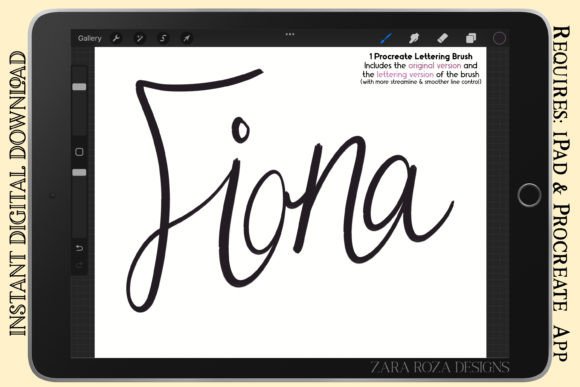
A critical feature that sets Fiona apart from many single-format brushes is its inclusion of two distinct versions within a single compressed .zip folder. Both are delivered in the standard .brush file format, ensuring seamless compatibility with the Procreate app. Understanding the difference between these versions is key to determining if this tool fits your specific project requirements.
- Original Version (Regular Line Control): This iteration is designed for versatility in rougher applications. It offers a balance of texture and control that suits types of lettering where a slightly more organic, less polished look is desired. It is highly effective for rough sketching, initial concept drawing, and situations where the artist wants to retain some of the natural "grain" of the stroke.
- Lettering Version (Smooth Line): This version prioritizes streamlined performance and enhanced line control. It is engineered specifically for hand lettering projects that demand smoother, more consistent curves. If your workflow involves precise calligraphy, detailed portrait art, or graphic design elements requiring crisp edges, this version minimizes unwanted jitter or texture, providing a cleaner finish.
This bifurcation allows users to switch between a sketching mindset and a finishing mindset without leaving their current canvas or searching for different assets. It addresses a common tradeoff in digital art: the tension between the organic feel of a sketch and the precision required for final line work.
Comparative Analysis: Fiona vs. Standard Brushes
When evaluating the Fiona - Procreate Lettering Brush against other options available in the Procreate library or third-party marketplaces, several factors come into play. Many default Procreate brushes offer basic pressure sensitivity but lack the nuanced tapering required for high-quality comic art or professional lettering. Conversely, some premium brushes focus heavily on texture, which can sometimes interfere with the clarity needed for technical drawings like makeup charts or architectural sketches.
Fiona occupies a middle ground that favors line integrity. Compared to a standard "ink" brush, Fiona's pressure curve is tuned to provide a wider range of thickness variation without becoming erratic at low pressures. This is crucial for cartoon portrait art and fashion sketches, where the transition from a heavy downstroke to a light upstroke defines the form. While other brushes might require extensive customization settings to achieve similar results, Fiona arrives pre-optimized for these specific use cases.
However, it is important to recognize the limitations. If an artist is looking for watercolor washes, textured painting effects, or photorealistic shading, Fiona is not the appropriate tool. Its design is strictly focused on line art, outlining, and stylized illustration. In scenarios requiring complex blending modes or color layering techniques typical of aesthetic painting, artists would likely need to supplement Fiona with other brushes designed for fill and texture rather than relying on it as a standalone solution.
Best-Fit Situations and Workflow Integration
The decision to adopt the Fiona brush should be based on the specific demands of the project. It excels in environments where speed and consistency are paramount. For instance, in the creation of comics and cartoons, the ability to outline characters quickly with a brush that naturally handles weight changes can significantly reduce production time. Similarly, for graphic designers creating vector-like illustrations within a raster environment, the smooth line version offers a level of precision that mimics pen tools while retaining the freedom of freehand drawing.
Consider the following practical applications:
- Character Design and Manga: The bold, varying line weight is ideal for defining the anatomy of anime or chibi characters. The pressure sensitivity allows for dramatic emphasis on joints and contours, enhancing the three-dimensional feel of the drawing.
- Hand Lettering and Calligraphy: The smooth line version is particularly beneficial here. It allows for the fluid motion necessary in cursive scripts and decorative typography, reducing the friction often felt when trying to create perfect loops and tails with a rigid brush.
- Fashion and Makeup Sketches: In these fields, clarity is non-negotiable. The regular line control version can be used for quick gesture drawings of outfits, while the smooth version ensures that the final details, such as eyeliner application or fabric stitching, are rendered with professional sharpness.
Furthermore, the availability of the brush in a compressed .zip folder containing both versions simplifies asset management. Users do not need to navigate multiple downloads or manage separate files; they have immediate access to both the rough and refined tools in one package. This efficiency supports a streamlined workflow, allowing artists to maintain momentum during the creative process.
Decision Factors: When to Choose Alternatives
While Fiona - Procreate Lettering Brush is a powerful tool for line-based art, it is not a universal solution. Artists should consider alternative resources if their primary goal involves textural exploration, atmospheric rendering, or experimental mark-making that goes beyond defined outlines. If a project requires a "painterly" feel with visible brush strokes, splatters, or dry-brush effects, a dedicated painting brush set would be more appropriate.
Additionally, the learning curve for pressure-sensitive brushes varies among users. Those new to the Apple Pencil might find the automatic thick-to-thin variation of Fiona initially difficult to master compared to fixed-width brushes. In such cases, starting with simpler tools to build confidence before transitioning to Fiona's dynamic range might be a prudent approach. The brush rewards steady hand control and familiarity with pressure dynamics; without these, the output may appear inconsistent.
Another consideration is the specific style of lettering. While Fiona is optimized for retro vintage aesthetics and bold styles, it may not perfectly replicate the fine, hairline details of modern minimalist typography or the extreme flourishes of blackletter script. Artists working in niche typographic styles should test the brush thoroughly to ensure it aligns with their visual goals before committing to it for client work.
Conclusion on Utility and Value
The Fiona - Procreate Lettering Brush represents a targeted solution for digital artists who prioritize line quality, pressure responsiveness, and stylistic consistency. By offering two distinct versions—regular for sketching and smooth for refined lettering—it provides a flexible toolkit that adapts to different stages of the creative process. Its strength lies in its ability to emulate the feel of traditional liners and markers within the digital realm, making it a valuable asset for comic artists, illustrators, and designers alike.
Ultimately, the value of Fiona depends on alignment with the user's specific artistic objectives. For those engaged in bold illustration, line art, and stylized character design, it offers a compelling blend of control and aesthetic appeal. However, for projects demanding heavy texturing or painterly effects, it serves best as a complementary tool rather than a primary instrument. By understanding its strengths, tradeoffs, and ideal use cases, artists can make an informed decision on whether integrating Fiona into their Procreate workflow will enhance their creative output.