Evaluating the 3D Glitter Tile Procreate Brush
In the realm of digital illustration and lettering, texture often serves as the defining element that separates flat designs from dynamic, tactile compositions. Artists frequently search for tools that can replicate physical media effects without the labor-intensive process of manual stippling or layering. The 3D Glitter Tile Procreate Brush has emerged as a specific solution for this need, offering a pre-configured engine designed to simulate the appearance of shimmering, faceted surfaces. This evaluation explores the functionality, utility, and limitations of this tool to help artists determine if it aligns with their creative workflow.
Understanding the Tool's Functionality
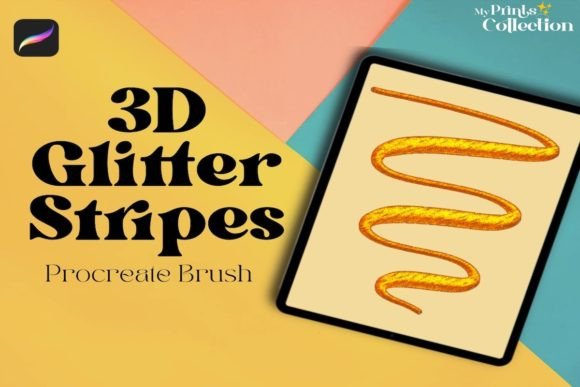
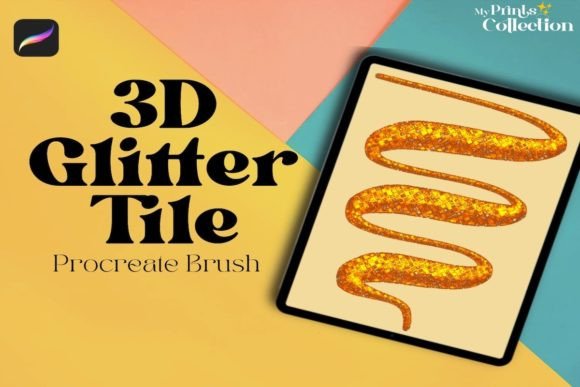
The Procreate 3D Glitter Tile Single Brush is not a standard airbrush or pencil; it is a specialized texture brush. Unlike basic brushes that apply solid color or simple opacity changes, this brush utilizes complex grain settings and scatter algorithms to generate individual "tiles" or particles upon contact with the canvas. These particles are rendered with highlights and shadows that mimic light reflecting off small, three-dimensional objects, creating the illusion of depth and sparkle.
When an artist drags the stylus across the screen, the brush deposits these glitter elements in a pattern that responds to pressure and tilt, depending on the specific configuration within the brush set. The result is a surface that appears to catch the light, adding a metallic or iridescent quality to lines and shapes. This capability is particularly useful for creating backgrounds, embellishing typography, or adding decorative accents to character design.
Why Artists Seek This Specific Texture
There are several practical reasons why a digital creator might consider integrating the 3D Glitter Tile Procreate Brush into their toolkit. First, efficiency is a primary driver. Manually painting hundreds of individual sparkles to create a cohesive glitter effect is time-consuming and requires significant patience. A dedicated brush automates this repetition, allowing the artist to achieve a high-volume texture effect in seconds.
Secondly, consistency is difficult to maintain with hand-painted textures. Human hands naturally vary in stroke width and spacing, which can lead to uneven distributions of glitter. A well-designed brush ensures that the density and size of the glitter tiles remain uniform across large areas, providing a professional finish that is hard to replicate manually. Finally, the aesthetic appeal of 3D rendering is distinct. It adds a layer of visual interest that flat colors cannot provide, making illustrations pop and drawing the viewer's eye to specific focal points.
Benefits and Workflow Integration
The primary benefit of using this single brush is the immediate transformation of flat vector-style lines into textured strokes. For lettering artists, this is invaluable. Applying the brush over a bold outline can instantly give text a premium, celebratory feel suitable for invitations, posters, or social media graphics. The brush interacts well with Procreate's blending modes. By setting the layer to "Color Dodge," "Overlay," or "Screen," the glitter effect can be intensified or muted to match the lighting conditions of the surrounding artwork.
Furthermore, because it is a single brush file, it integrates seamlessly into existing libraries without cluttering the workspace with multiple variations. This simplicity reduces cognitive load, allowing the artist to focus on composition rather than tool selection. The brush also supports Procreate's streamlining features, meaning that shaky hands do not necessarily translate to messy glitter applications, provided the brush settings are tuned correctly.
Tradeoffs and Technical Considerations
While the 3D Glitter Tile Procreate Brush offers significant advantages, there are tradeoffs to consider. The most notable limitation is compatibility. This tool is strictly designed for the Procreate App version 5 or higher. It relies on specific engine capabilities found within Apple's iPadOS ecosystem. Consequently, it is not compatible with Photoshop, Illustrator, or other desktop-based software. Artists who work primarily on Windows machines or Mac computers will find this asset unusable.
Another consideration is the potential for visual noise. Because the brush generates random patterns, it can sometimes create a chaotic look if applied too heavily or at low resolutions. If the final output requires crisp, clean edges—such as for small icons or logos—the granular nature of the glitter may cause pixelation or loss of detail when scaled down. Additionally, while the brush simulates 3D, it is still a 2D raster image. It does not possess actual geometric depth, so it may not respond dynamically to changing light sources in a scene unless the artist manually adjusts the highlights.
Ideal Use Cases
This brush is a strong fit for specific scenarios where texture and speed are paramount. It excels in:
- Celebratory Design: Creating assets for holidays, birthdays, or awards where a festive, sparkling aesthetic is required.
- Social Media Graphics: Producing eye-catching thumbnails or Instagram posts where visual impact needs to be immediate.
- Lettering and Calligraphy: Adding dimension to script fonts and hand-lettered titles to make them stand out against plain backgrounds.
- Fashion Illustration: Simulating sequins, rhinestones, or metallic fabrics on clothing sketches without needing to paint every bead individually.
In these contexts, the brush provides a rapid way to elevate the perceived value of the artwork. It bridges the gap between a rough sketch and a polished final piece by adding a layer of finish that suggests luxury or celebration.
When Alternatives May Be Preferable
Despite its strengths, the 3D Glitter Tile Procreate Brush is not a universal solution. Artists should consider alternatives in the following situations:
- High-Resolution Print Work: If the project involves large-scale printing where every pixel is scrutinized, the algorithmic randomness of the brush might reveal repeating patterns or artifacts. In such cases, custom-painted textures or vector-based scattering in Illustrator may yield superior results.
- Cross-Platform Projects: If the workflow involves collaboration with teams using different software ecosystems, relying on a Procreate-exclusive asset creates a bottleneck. Standard brushes or stock photos might be more versatile for shared projects.
- Subtle Texturing: Sometimes, a heavy glitter effect can overwhelm the subject. If the goal is a subtle sheen rather than a blinding sparkle, a softer grain brush or a manual overlay with reduced opacity might offer better control.
- Animation: While Procreate supports animation assist, complex particle brushes can sometimes strain performance during frame-by-frame rendering. Simpler brushes may ensure smoother playback.
Practical Decision-Making Insights
Before deciding to download or purchase the Procreate 3D Glitter Tile Single Brush, artists should evaluate their current hardware and software environment. Ensure your device meets the requirement of running Procreate App version 5 or higher. Older versions of the app lack the necessary brush engine updates to render the 3D effects correctly, leading to distorted outputs or complete failure to load.
Additionally, test the brush on a duplicate layer before committing to the main canvas. Digital art allows for non-destructive editing, but understanding how the brush interacts with your specific color palette is crucial. Try applying it over dark backgrounds versus light ones to see how the contrast affects the visibility of the "glitter." If the effect feels too harsh, experiment with layer opacity and blending modes immediately.
Ultimately, the value of this brush lies in its ability to solve a specific problem: the efficient creation of shiny, textured surfaces within the Procreate ecosystem. It is not a replacement for artistic skill or fundamental design principles, but rather a lever that amplifies specific stylistic choices. For those working exclusively on iPads and seeking to add a touch of glamour to their digital art, lettering, and illustrations, this tool represents a practical and effective resource. However, for artists requiring cross-software compatibility or ultra-high-resolution precision, investing time in custom texture creation or exploring alternative software solutions may be the more strategic path.