Poise - Procreate Lettering Brush
If you have ever felt that your digital lines lack the soul of a real ink pen, you are not alone. Many artists struggle to find a tool that balances the precision of a liner with the organic feel of traditional media. The Poise - Procreate Lettering Brush was created to solve exactly this problem. It is more than just a standard brush; it is a digital instrument designed to mimic the retro vintage aesthetic of classic lettering pens while offering modern control for iPad creators.
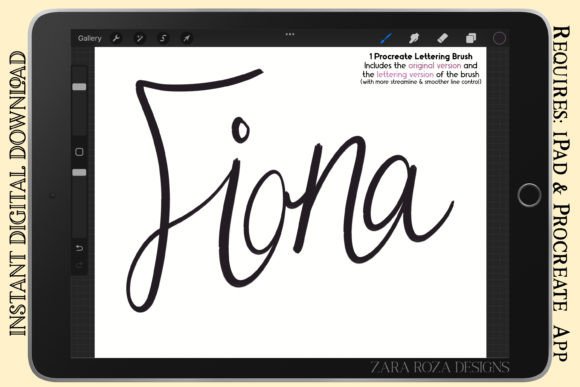
This brush brings a distinct character to your artwork through its pressure sensitivity. Unlike rigid vector tools, Poise responds to the weight of your Apple Pencil, creating natural thick and thin width variations. Whether you are outlining a comic panel or sketching a fashion design, this tool helps you achieve a hand-drawn look without the mess of physical ink.
Why Artists Choose This Retro Vintage Tool
The appeal of the Poise - A Procreate lettering brush lies in its ability to bridge the gap between technical drawing and expressive art. In the world of digital illustration, many default brushes can feel too sterile or overly smooth. Poise introduces a texture and flow that feels familiar to anyone who has used a dip pen or a fine-liner marker on paper.
For professionals and hobbyists alike, the value comes from versatility. You do not need to switch between multiple tools to get different effects. With Poise, you can transition from bold illustration strokes to delicate line art simply by adjusting your hand pressure. This makes it an essential asset for graphic designers working on stylised illustrations, as well as educators teaching students how to control line weight in digital environments.
Understanding the Two Included Versions
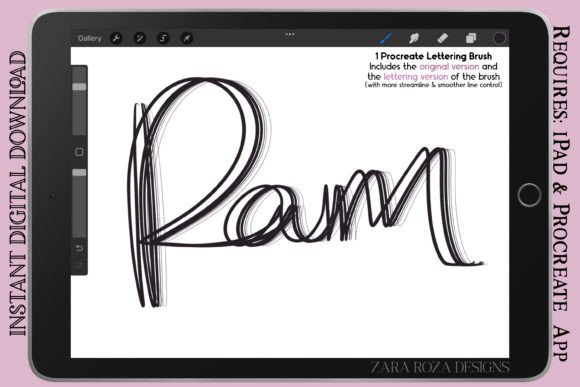
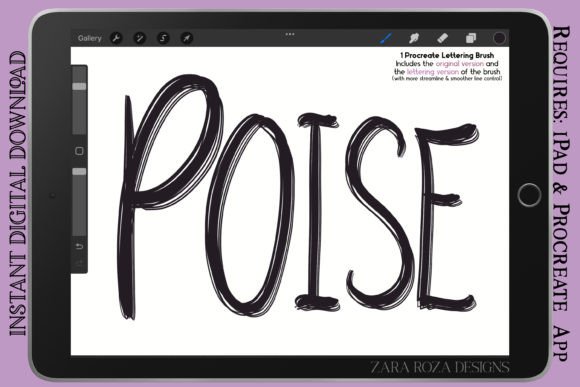
One of the most practical features of this package is that it includes one brush with two distinct versions. This dual-option approach ensures that the tool adapts to your specific workflow rather than forcing you to adapt to the tool. Here is how the two versions differ and when to use them:
- Original Version (Regular Line Control): This version offers a slightly rougher texture and less rigid smoothing. It is perfect for rough sketching, initial concept drawings, and types of lettering where a bit of grit adds character. If you are drawing manga, anime, or chibi character art and want to maintain a spontaneous, energetic feel, this is your go-to setting.
- Lettering Version (Smooth Line): Designed for streamlined control, this version minimizes jitter and provides a cleaner path. It is ideal for final hand lettering, calligraphy, and situations where smoother lines are required. When you are creating makeup charts, detailed portrait art, or precise comic outlines, the Lettering version ensures your lines remain consistent and professional.
Practical Applications for Creators
The utility of the Poise brush extends far beyond simple doodles. Its pressure-sensitive engine makes it suitable for a wide range of creative projects. For instance, illustrators working on cartoons and comics often need a reliable liner pen for outlining detail. Poise acts as that digital marker, allowing you to define edges with confidence while maintaining the warmth of a hand-drawn sketch.
Fashion designers and portrait artists also benefit significantly. When drawing fashion sketches, the ability to create varying line widths helps convey the flow of fabric and the structure of the body. Similarly, in portrait art, using a brush with retro vintage aesthetics can add a timeless quality to the piece, making it stand out against the backdrop of hyper-realistic digital painting.
Beyond illustration, the brush is excellent for functional design tasks. Makeup artists and beauty bloggers frequently use iPads to draw makeup charts. The precision of the Lettering version allows for clear, legible diagrams, while the Original version can be used for quick mood boards or aesthetic painting concepts. Even entrepreneurs and marketers can use this tool to create unique social media graphics, logo drafts, or blog headers that feel personal and authentic.
Mastering Pressure Sensitivity for Better Lines
To get the most out of the Poise - Procreate Lettering Brush, understanding pressure sensitivity is key. The brush is calibrated to react to the force applied by your Apple Pencil. Light pressure results in thin, hairline strokes, perfect for intricate details like eyelashes in anime or fine texturing in line art. Heavier pressure creates bold, thick strokes, which are essential for defining shadows or creating impactful headlines in hand lettering.
This dynamic range allows for a level of expressiveness that static brushes cannot match. Beginners might start by practicing simple loops and circles to get a feel for how the brush transitions from thin to thick. As you become more comfortable, you will find that your natural hand movements translate directly into the digital canvas, making the learning curve much gentler than expected.
Who Benefits Most from This Digital Brush?
Whether you are a beginner taking your first steps into digital art or a seasoned freelancer looking to expand your toolkit, there is a place for Poise in your workflow. Casual users who enjoy drawing doodles or sketching during meetings will appreciate how intuitive it is to pick up and use immediately. There is no complex setup required; simply load the brush and start creating.
Professionals such as graphic designers and comic artists will value the efficiency it brings to their process. By having both a rough and a smooth version available, you can complete entire projects without needing to search for alternative brushes. Small business owners who create their own branding materials can use Poise to give their logos and packaging designs a unique, artisanal look that resonates with customers seeking authenticity.
Furthermore, educators teaching digital art classes can use this brush to demonstrate fundamental concepts of line weight and pressure control. It serves as an excellent teaching aid for showing students how digital tools can emulate traditional techniques, making the transition from paper to screen less intimidating.
Key Considerations Before You Start
While the Poise brush is highly versatile, keeping a few things in mind will help you maximize its potential. First, ensure your Procreate app settings are optimized for your iPad model. Sometimes, adjusting the stabilization settings in Procreate can further enhance the smoothness of the Lettering version if you find your hand shakes slightly.
Second, remember that practice is still necessary. Even though the brush mimics real ink, mastering the pressure curve takes time. Do not expect perfection on your first stroke. Use the Original Version for your early sketches to build confidence before switching to the Lettering Version for final pieces.
Finally, consider the context of your project. While Poise is fantastic for retro vintage aesthetics, bold illustrations, and stylised work, it may not be the best choice for photorealistic rendering or soft watercolor effects. Knowing when to use this liner-style brush versus other textures will make your overall artwork more cohesive and polished.
In conclusion, the Poise - Procreate Lettering Brush offers a robust solution for anyone looking to add character and depth to their digital creations. With its dual versions, pressure sensitivity, and wide range of applications from manga to makeup charts, it is a valuable addition to any artist's library. Whether you are sketching a quick idea or refining a commercial illustration, Poise helps you bring your vision to life with the confidence of a master penman.