Transforming Digital Art with the Metal Rust Procreate Brush
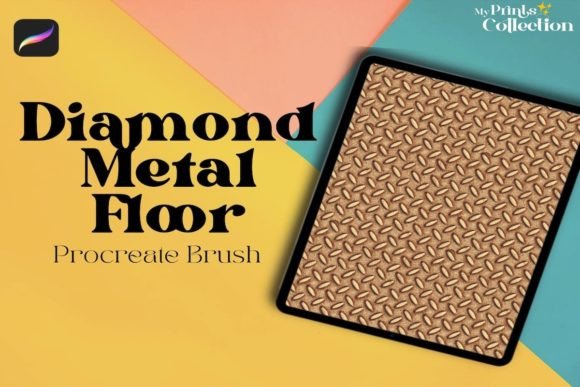
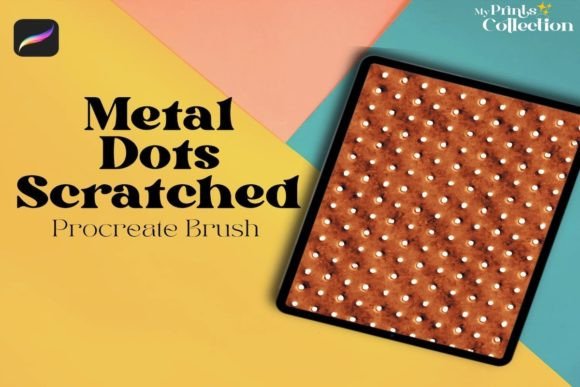
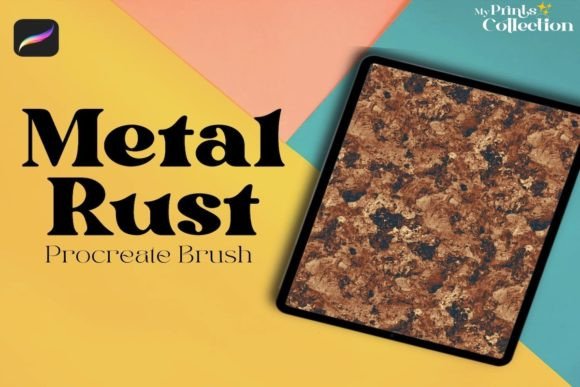
In the evolving landscape of digital illustration, texture is often the deciding factor between a flat image and a piece that feels tangible. Artists constantly search for tools that can replicate the grit, age, and organic decay found in the real world without spending hours manually painting every scratch and speckle. This is where the Metal Rust Procreate Brush becomes an indispensable asset. Designed specifically to inject realistic metal or rust seamless pattern textures into your work, this single brush offers a shortcut to complexity that manual techniques simply cannot match in terms of speed and consistency.
The appeal of weathered metals lies in their unpredictability. Whether you are designing a dystopian sci-fi vehicle, restoring an antique object in a still life, or creating a gritty urban background, the presence of oxidation adds a layer of history and narrative to the artwork. The Metal Rust Procreate Single Brush captures this essence perfectly, allowing creators to apply these complex textures with a single stroke while maintaining full control over opacity, flow, and blending modes.
Why Texture Matters in Modern Digital Workflows
Digital art has come a long way from the clean, vector-like lines of early computer graphics. Today’s audiences expect depth. They want to feel the roughness of a corroded pipe or the flaking paint on an old car bumper. Achieving this level of detail traditionally required a tedious process: finding high-resolution photos, masking them out, adjusting color balance, and manually painting over inconsistencies to make them blend seamlessly with the rest of the composition.
This workflow is not only time-consuming but can also break an artist's creative flow. When you have to stop drawing to hunt for assets or adjust complex layer masks, momentum stalls. The Metal Rust Procreate Brush solves this by integrating the texture directly into the drawing tool. It functions as a dynamic stamp that adapts to your pressure and tilt, ensuring that the rust pattern looks natural rather than pasted on. This integration allows artists to focus on composition and lighting rather than getting bogged down in technical texturing tasks.
Understanding the Seamless Pattern Capability
One of the standout features of this tool is its ability to generate a seamless pattern texture. In design, a seamless pattern is crucial when covering large surfaces like walls, floors, or vehicle bodies. If a texture repeats with visible edges or hard lines, it immediately looks artificial. The Metal Rust Procreate Single Brush is engineered to tile perfectly, meaning you can drag it across a canvas hundreds of times, and the transition between strokes will remain invisible.
This characteristic makes it ideal for:
- Background Creation: Quickly filling large areas with a consistent, aged metal look.
- Surface Detailing: Adding subtle wear and tear to machinery or armor without disrupting the underlying form.
- Concept Art: Rapidly iterating on ideas by applying different levels of rust to test how "old" a design should appear.
Unlike standard brushes that might leave gaps or overlapping artifacts, this specific brush maintains the integrity of the pattern, ensuring that the final output looks cohesive and professional.
Practical Applications Across Industries
The utility of the Metal Rust Procreate Brush extends far beyond hobbyist sketching. It has found a home in various professional sectors where visual storytelling relies heavily on environmental context.
Concept Art and Game Design
Game designers and concept artists frequently need to create environments that tell a story of abandonment or industrial decay. Imagine a post-apocalyptic cityscape or an abandoned factory level in a video game. Painting every rivet and rust spot individually would take days. With this brush, an artist can block in the base metal tone and then use the Metal Rust Procreate Single Brush to overlay the corrosion. By adjusting the blend mode to "Multiply" or "Overlay," the rust interacts naturally with the lighting already established in the scene, saving countless hours of production time.
Product Visualization and Advertising
In advertising, showing a product in a "lived-in" state can be more appealing than a pristine version. For example, a campaign for rugged outdoor gear might feature equipment that looks battle-worn. Using the Metal Rust Procreate Brush, illustrators can add realistic patina to zippers, buckles, and frames, making the product appear durable and tested. This technique bridges the gap between sterile 3D renders and hand-painted realism, offering a unique aesthetic that stands out in a crowded market.
Illustration and Storytelling
For book illustrators and comic artists, texture adds emotional weight. A character holding a rusty key conveys a different feeling than one holding a shiny new one. The brush allows for nuanced application; a light touch creates surface dust, while heavy pressure reveals deep pitting and flaking. This dynamic range gives artists the freedom to express the age and condition of objects with precision, enhancing the narrative quality of their illustrations.
Technical Requirements and Compatibility
Before integrating this tool into your toolkit, it is essential to understand the software environment required for optimal performance. The Metal Rust Procreate Single Brush is built exclusively for the iPad ecosystem. To utilize its full potential, you must meet specific software requirements.
Software Requirement: You need the Procreate App version 5 or higher. Version 5 introduced significant improvements to brush engines and texture handling, which are necessary for this brush to render the complex rust patterns correctly. If you are using an older version, the brush may not load, or the texture may appear distorted and fail to repeat seamlessly.
It is also critical to note what this brush is not compatible with. Many artists work across multiple platforms, hoping to share assets between applications. However, this brush file format is proprietary to Procreate. It is not compatible with Photoshop or Illustrator. Attempting to import this brush into Adobe software will result in errors or a failure to recognize the file entirely. If your workflow relies heavily on desktop-based Adobe Creative Cloud applications, this specific asset will not function within those programs. You must be working within the Procreate interface on an iPad to access these capabilities.
Installation and Setup
Once you have confirmed your app version, importing the brush is straightforward. Simply download the brush set file (usually a .brushset extension), tap on the file, and select "Import." The Metal Rust Procreate Brush will appear in your library, ready to be dragged onto your active canvas. From there, you can customize settings like grain, scatter, and wet mix to fine-tune the effect to your specific project needs.
Maximizing the Effect: Tips for Realism
While the Metal Rust Procreate Single Brush does much of the heavy lifting, achieving photorealism still requires some artistic intuition. Here are a few practical considerations to get the most out of the tool:
- Layer Management: Never apply the rust directly on top of your base color if you want flexibility. Create a new layer above your metal base and set the blend mode to Multiply or Color Burn. This allows the rust to darken the metal underneath while preserving the highlights and shadows you've already painted.
- Varying Opacity: Real rust is never uniform. Use the Apple Pencil's pressure sensitivity to vary the opacity of the brush strokes. Lighter strokes suggest surface oxidation, while darker, heavier strokes indicate deep corrosion.
- Color Adjustment: While the brush provides the texture, the color is often just a starting point. After applying the pattern, use the Hue/Saturation/Luminance adjustment layer in Procreate to shift the rust colors from orange to reds, browns, or even purples depending on the lighting environment.
- Masking: Use selection tools to mask off areas where rust shouldn't appear, such as freshly polished edges or areas protected by grease or oil. This contrast enhances the realism significantly.
Considerations Before Adoption
When deciding whether to adopt the Metal Rust Procreate Single Brush into your regular toolkit, consider your current pain points. If you find yourself struggling with repetitive texturing tasks or if your digital paintings lack that final touch of grit, this brush offers an immediate solution. It is particularly valuable for artists who value efficiency without sacrificing quality.
However, keep in mind that this is a specialized tool. It excels at creating rust and metal textures but is not a replacement for a comprehensive brush set that includes pencils, markers, and airbrushes. It is best viewed as a powerful addition to an existing library rather than a standalone solution for all painting needs. Furthermore, ensure your iPad hardware can handle the processing load if you are working on very large canvases with multiple high-resolution texture layers, though modern iPads generally manage this without issue.
Ultimately, the Metal Rust Procreate Single Brush represents a convergence of technology and artistic expression. It empowers creators to bring the raw beauty of decay and age into their digital worlds with unprecedented ease. By understanding its capabilities, limitations, and proper usage, artists can elevate their work, adding a layer of authenticity that resonates deeply with viewers.